
What Is an AI Agent? A Plain English Guide for Business Owners
An AI agent is a software system that can perceive its environment, make decisions, and take action across your business tools — without a human approving every step. It is not a chatbot. It is not a simple automation rule. It is a goal-driven system that figures out *how* to complete a task, executes it across multiple systems, and corrects itself when something goes wrong.
If you are a business owner or operations leader trying to understand what AI agents actually are — and whether they are relevant to your organisation — this guide will give you a straight answer.
Quick Answer: An AI agent is an autonomous software system that takes a goal, breaks it into steps, uses your business tools and data to execute those steps, and delivers an outcome — with minimal human intervention. Unlike a chatbot that waits for your next message, an agent gets to work.
Key Takeaways:
AI agents are goal-driven, not prompt-driven. They decide how to complete a task, not just what to say next.
They are fundamentally different from chatbots and rule-based automation — and knowing the difference will save you from buying the wrong tool.
According to PwC, 79% of organisations are already using AI agents, with 66% reporting measurable productivity gains.
The biggest barrier to agent ROI is not technology — it is how organisations are set up to delegate to it.
Tenfold implements AI agents for operations and C-suite leaders who want outcomes, not experiments.
The One-Sentence Definition That Actually Makes Sense
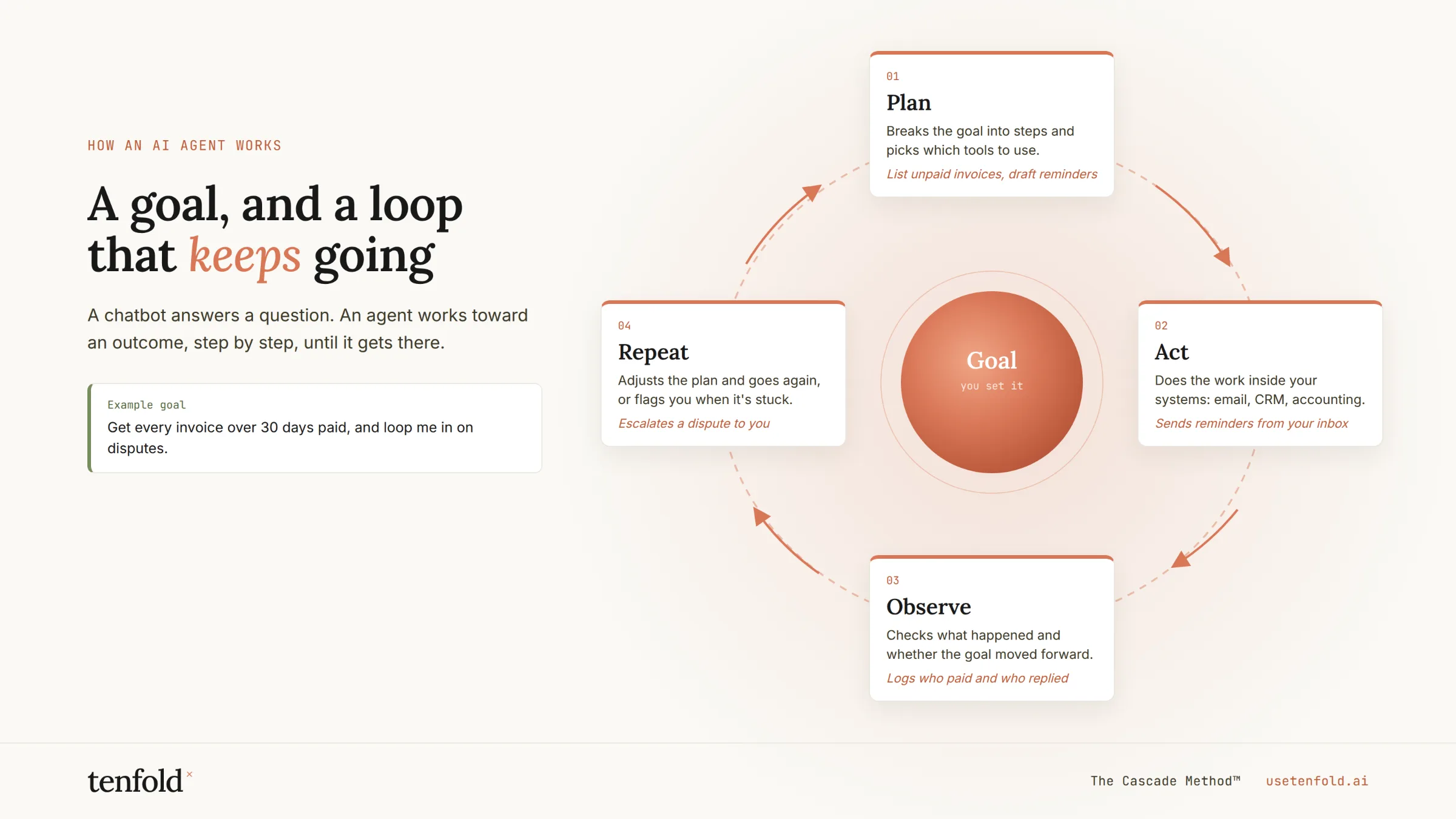
An AI agent is a system that carries out tasks with a degree of autonomy. At its core is a decision-making loop: the agent interprets a goal, plans the steps required, calls the tools it needs, observes the results, and decides what to do next — until the task is done.
In an enterprise context, that loop runs against real systems. Agents query databases, call APIs, read documents, send messages, and update records. They recover from errors. They remember what they have already done.
Here is a concrete example. An employee requests a replacement laptop. Instead of triggering a manual ticket chain, an AI agent interprets the request, validates policy eligibility, checks inventory, creates a procurement request, updates the asset management system, and schedules delivery — automatically.
That is the difference between AI that answers and AI that *acts*.
AI Agent vs Chatbot vs Automation: The Distinction That Matters
Most business owners have already encountered chatbots and basic automation tools. Here is the honest breakdown of where each belongs.
A chatbot answers. It waits for a user to ask something, returns a response based on rules or a language model, and stops. It is reactive and conversation-scoped. A chatbot is appropriate for pricing FAQs, basic support routing, and onboarding flows.
Automation follows. It runs a fixed workflow every time a trigger fires — the same way, forever. If this, then that. Automation is the right tool for predictable, high-volume, low-complexity processes: copying a lead from a web form into your CRM, sending a confirmation email when a payment clears.
An AI agent decides. It reads a situation, picks the tools it needs, takes multi-step action across your systems, and checks what happened. The path to the outcome is not pre-programmed — the agent works it out based on context.
The practical split for most businesses: use automation for the predictable 80% of your workflows, and an agent for the judgment-heavy 20% where context, data, and decisions are involved.
According to PwC's 2025 AI Agent Survey, among companies already using AI agents, 57% are actively using or planning to use agents in customer service, and 54% in sales and marketing — precisely because those functions require judgment, not just rules.
| | Chatbot | Automation | AI Agent |
|---|---|---|---|
| Initiates action | No | Yes (on trigger) | Yes (on goal) |
| Makes decisions | No | No | Yes |
| Adapts to context | Limited | No | Yes |
| Crosses multiple systems | No | Sometimes | Yes |
| Best for | FAQs, conversations | Predictable workflows | Complex, judgment-based tasks |
How an AI Agent Actually Works: The Four-Part Loop
You do not need to understand the engineering to be a good buyer. But understanding the four parts of how an agent operates will help you evaluate what vendors are actually selling you.
1. Perception
The agent takes in a goal or a trigger — a plain-language instruction, an event from another system, or an inbound request. It interprets intent and context, not just keywords.
2. Planning
The agent breaks the goal into executable steps. It determines which tools it needs, in what order, and what conditions would cause it to take a different path. This is where agents differ fundamentally from automation: the plan is not pre-written by a human.
3. Execution
The agent calls your tools — APIs, databases, CRM records, communication platforms — and takes action. It can update a Salesforce record, send a Slack message, pull a report, draft a contract clause, or trigger a downstream workflow.
4. Observation and Correction
After each action, the agent evaluates the result. Did it work? Does it need to retry? Has the goal changed based on what it found? This loop continues until the task is complete — or until a defined human approval point is reached.
Where AI Agents Create Real Business Value
Agents are not a solution looking for a problem. The use cases where they consistently deliver ROI share a pattern: multi-step work, judgment calls, and data spread across systems that a human currently handles manually.
Customer service and support: According to a field study of 5,179 support agents, access to a generative-AI conversational assistant increased productivity — issues resolved per hour — by 14% on average, with a 34% gain for novice and lower-skilled agents. AI agents handling front-line support resolve 50–65% of inquiries without human intervention, while cutting resolution time by 25–40%.
Sales and revenue operations: Sales organisations using AI agents see a 25–47% productivity increase from time savings on repetitive tasks, freeing teams to focus on closing. Agents handle lead qualification, CRM data entry, follow-up sequences, and pipeline forecasting — work that currently burns your best salespeople's time.
Business process automation: According to the Lyzr State of AI Agents in Enterprise Report, 64% of AI agent adoption is centred on business process automation. Routine finance, HR, and operations workflows — invoice reconciliation, employee onboarding, compliance checks — are the most common starting points.
IT and operations: Agents classify support tickets, prioritise incidents, route change requests, and auto-remediate known error types. Gartner projects productivity-focused AI implementations can generate efficiency gains of 18–32% across customer service, administrative, and operational workflows.
According to Google Cloud's ROI of AI 2025 report, 88% of agentic AI early adopters are already seeing a positive return on their investment, and 56% of firms using agents have seen revenue gains, with most estimating a 6–10% uplift.
The Real Barrier Is Not the Technology
Here is what the data tells us — and what most vendors will not say directly.
According to the Lyzr State of AI Agents in Enterprise Report, 62% of enterprises exploring AI agents lack a clear starting point, 41% still treat them as a side project, and 32% stall after a pilot and never reach production.
Gartner's 2025 research found that anticipated efficiency gains of 30–50% from business automation were repeatedly stalled — not due to AI capability shortfalls, but due to the same three infrastructure problems: integration gaps, governance, and auditability.
The bottleneck is not AI capability. It is that most organisations are not yet set up to delegate to it.
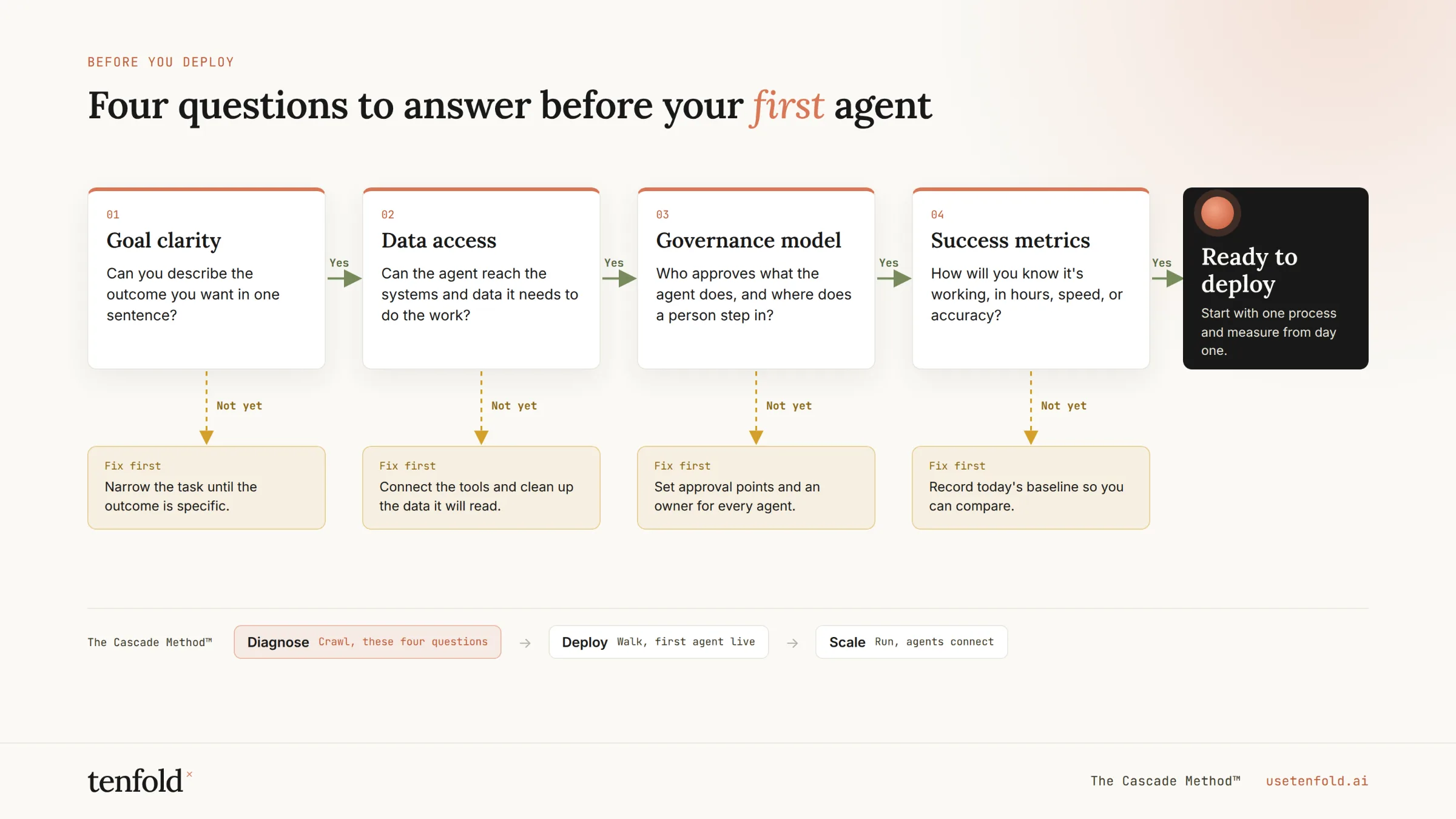
Deploying an AI agent that actually works requires:
A well-defined goal. Agents need clear success criteria, not vague objectives.
Clean system access. Agents are only as capable as the tools and data they can reach.
Governance guardrails. Knowing which decisions require a human in the loop is not optional.
Measurable KPIs from day one. Start narrow, measure hard, then expand.
At Tenfold, we have seen this pattern across every deployment: organisations that define the boundary of agent autonomy before they build see dramatically better outcomes than those that figure it out in production.
Is Your Business Ready for an AI Agent?
Not every workflow needs an agent. Here is a practical decision framework.
Start with a chatbot or automation if:
The task is a single-step response or a fixed-rule workflow
The inputs and outputs are fully predictable
There is no need to pull data from more than one system
Speed of setup matters more than depth of capability
Deploy an AI agent if:
The task involves multiple steps and judgment calls
Outcomes depend on data spread across different systems
The workflow currently requires a human to read context and make a decision
You want the process to improve over time without manual reprogramming
For most mid-market operations teams, the honest answer is: you need all three — automation for volume, chatbots for structured conversation, and agents for the decisions that currently fall between the cracks.
According to IBM's 2025 C-suite survey, 55% of executives are actively developing or deploying an agentic AI operating model, and 60% plan to adopt structures where agents coordinate across finance, HR, and supply chain. The shift is not coming. It is happening.
Summary
AI agents are not chatbots with better marketing. They are a fundamentally different class of software — goal-driven, context-aware, and capable of executing multi-step work across your business tools without human direction at every step. The technology is mature. The adoption data is unambiguous. The organisations winning with agents are the ones that define the problem clearly before they pick the tool.
At Tenfold, we specialise in implementing AI agents for operations leaders and C-suite teams who want outcomes, not pilots. Our proof is Inforge — a full Salesforce consultancy delivered entirely by AI agents, faster and at a fraction of traditional cost. If you want to see what agent-first looks like in practice, we can show you.
[Ready to move past the pilot? Talk to Tenfold about your first production AI agent deployment.]
Frequently Asked Questions
Q: What is an AI agent in simple terms?
A: An AI agent is software that takes a goal, works out how to achieve it, and takes action across your business tools — without a human directing every step. Think of it as an employee who can access your systems, make decisions based on context, and complete multi-step tasks independently.
Q: What is the difference between an AI agent and a chatbot?
A: A chatbot responds to messages and stops. An AI agent takes a goal and acts on it across multiple steps and systems, without waiting for a new prompt at each stage. Chatbots are reactive; agents are proactive and goal-driven.
Q: What can an AI agent do for my business?
A: AI agents can handle customer support triage, sales follow-ups, CRM data management, invoice processing, employee onboarding, IT ticket resolution, and any multi-step workflow where a human currently has to read context and make a decision. The highest-ROI use cases combine high volume, multiple systems, and repetitive judgment calls.
Q: How is an AI agent different from automation?
A: Automation runs a pre-defined rule every time a trigger fires — the same way, forever. An AI agent evaluates the situation, chooses its tools, and adapts its approach based on what it finds. Automation is deterministic; an agent is adaptive.
Q: How do I know if my business is ready for an AI agent?
A: Ask two questions: Is there a workflow where a human currently reads context across multiple systems and makes a judgment call? And do you have a clear, measurable definition of what success looks like? If yes to both, you have a strong candidate for an agent deployment. If your process is predictable and single-step, start with automation.
